
Disclaimers: Hey! Just so you know, this article contains GoHighLevel Pricing Breakdown in 2025 affiliate links to tools I genuinely recommend. If you purchase through these links, I may earn a small commission at no extra cost to you. This helps keep the site running and allows me to continue providing free, helpful content. I only recommend tools I’ve personally used or thoroughly researched.
If you’ve ever tried decoding GoHighLevel pricing, you know it can feel like solving a Rubik’s cube blindfolded. Between plan tiers, usage-based fees, white label options, and surprise add-ons, the cost structure isn’t as clear-cut as it seems on the surface.
But don’t worry — this guide simplifies everything. Whether you’re running a small agency, launching a SaaS business, or just exploring your CRM options, I’ll walk you through the real GoHighLevel pricing in 2025. From the core plans to sneaky extras, let’s break it down.
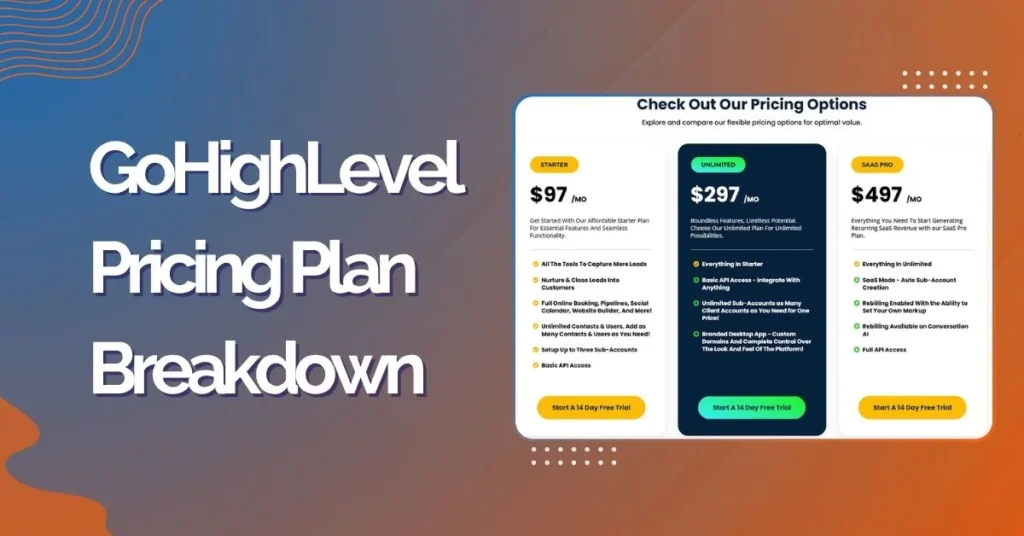
GoHighLevel Pricing Plans for 2025
Three main GoHighLevel pricing plans:
| Plan Name | Monthly Price | Annual Discount | Key Features |
| Starter Plan | $97/month | None | 1 sub-account, basic CRM tools |
| Unlimited Plan | $297/month | 16% off if yearly | Unlimited sub-accounts, full access |
| Pro (SaaS Mode) | $497/month | 16% off if yearly | White label + AI workflows + API |
Expert Advice: Which GoHighLevel pricing Plan Should You Choose?
Starter Plan – Best for Solo Businesses:
- Ideal if you’re a freelancer or local business owner.
- One account is enough to run your funnels, automate leads, and manage customers.
Unlimited Plan – Best for Growing Agencies:
- Great for digital marketing agencies managing multiple clients.
- SaaS Mode allows you to create and sell custom plans.
Pro Plan – Best for SaaS Entrepreneurs:
- Want to build your own white-labeled platform with full branding?
- Includes a custom desktop app, API access, SMTP & domain white labeling.
Real-World Example: A web agency managing 6 clients should choose Unlimited, while a white-label consultant launching their own software brand should go for Pro.
Ready to see which plan fits your business? Start your GoHighLevel free trial here and test all features risk-free for 14 days.
Starter vs. Unlimited vs. Pro GoHighLevel pricing — What’s the Real Difference?
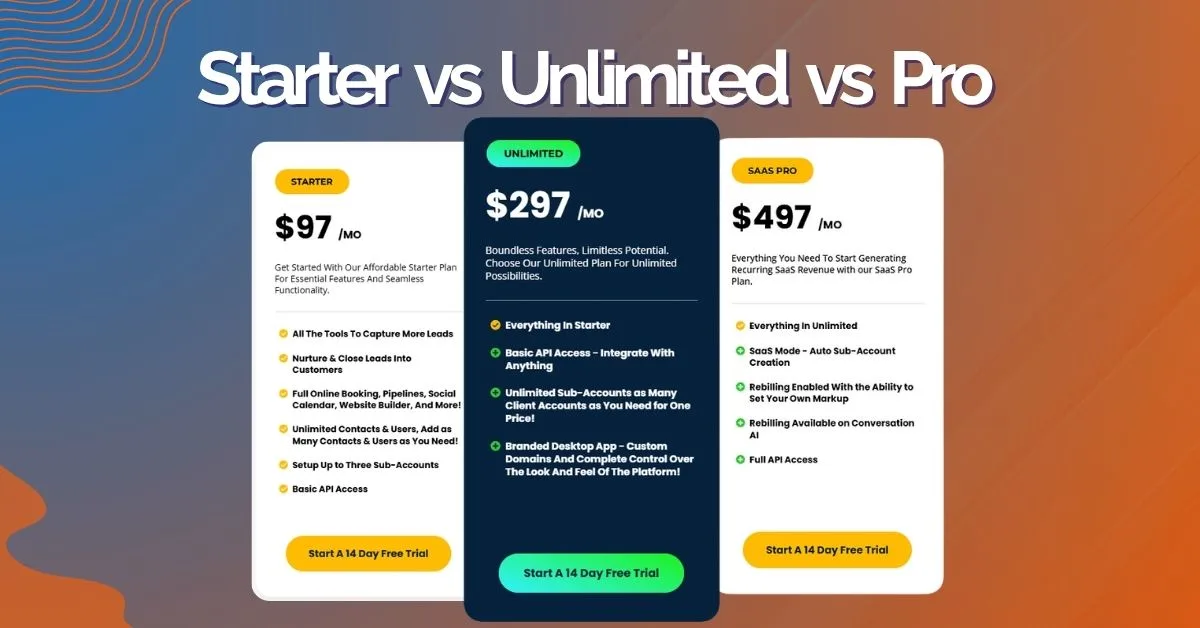
Let’s break it down beyond just pricing:
Feature Comparison by GoHighLevel pricing Plan (Simple Overview)
Here’s a straightforward comparison of the key features offered in each GoHighLevel pricing plan:
| Features | Starter | Unlimited | Pro (SaaS Mode) |
| Funnel Builder | Yes | Yes | Yes |
| Website Builder | Yes | Yes | Yes |
| CRM & Pipeline Management | Yes | Yes | Yes |
| Calendars and Booking | Yes | Yes | Yes |
| Email Marketing | Yes | Yes | Yes |
| SMS Marketing | Yes | Yes | Yes |
| Workflow Automation | Yes | Yes | Yes |
| Surveys and Forms | Yes | Yes | Yes |
| Memberships | Yes | Yes | Yes |
| Analytics & Reports | Yes | Yes | Yes |
| AI Tools | Yes | Yes | Yes |
| Affiliate Management | No | Yes | Yes |
| Sub-Accounts | 3 | Unlimited | Unlimited |
| API Access | No | Yes | Yes |
| Branded Desktop App | No | Yes | Yes |
| White Label Mobile App | No | No | Yes |
| SaaS Mode | No | No | Yes |
| Rebilling | No | Without Markup | With Markup |
| Template Sharing | No | No | Yes |
| Custom Dashboards | No | For Own Use | Full Control |
If you’re just starting out, the Starter plan keeps things lean. But for scaling agencies or SaaS startups, Unlimited or Pro is practically essential.
Want to explore all these features hands-on? Get your GoHighLevel free trial and see which plan works best for your business model.
GoHighLevel White Label Pricing Explained: What You Really Pay For
GoHighLevel white label pricing is included in the Pro Plan ($497/month), ideal for agencies reselling under their own brand. This GoHighLevel pricing tier lets you fully white label the URL, login, emails, and mobile app for a fully branded client experience.
What you’re paying for isn’t just a tool — it’s a business in a box. GoHighLevel allows you to:
- Launch your own SaaS with automated billing and client access
- Use the white label mobile app (available via Pro Plan add-ons)
- Control platform branding from domain to dashboard
- Set your own prices and margins for clients
Pro Tip: The white label mobile app comes with an extra cost of $497 one-time setup fee + $97/month, but it unlocks massive SaaS potential. If you’re serious about scaling, it’s a must.
White labeling transforms GoHighLevel from just a CRM into a scalable revenue-generating platform — but it’s important to budget not just for the base price, but also for add-ons, SMS credits, and email volume depending on your client needs.
GoHighLevel Free Trial and Login Experience
New users can sign up for a 14-day free trial at go.highlevel.com. It includes full CRM, funnel builder, SMS/email automation, and even some AI features.
What to Expect After Login
- Dashboard tour
- Guided funnel setup
- Twilio, Mailgun, and Stripe integrations
- Access to the mobile GoHighLevel App for on-the-go control
Pro Tip: The mobile app is available on iOS and Android, letting you manage leads, pipelines, and messages from anywhere.
How GoHighLevel Pricing Wallet-Based Works
GoHighLevel doesn’t bill for some services upfront. Instead, you preload an internal Agency Wallet and pay as you go.
This wallet funds things like:
SMS/MMS Texting
You’re charged per message segment. A single segment is 160 characters. Messages with images, emojis, or special characters become MMS and cost more.
For example:
- Basic reminder text (under 160 characters): ~$0.0079
- Image-heavy promotion: ~$0.02–$0.03
If you’re texting 1,000 contacts a week with a promo, that’s $20–$30 in costs — small at first, but massive over months. To save, keep messages short and split lists.
Voice Calling
Outbound calls are billed per minute (~$0.013/min). For context:
- 100 calls/day × 5 minutes/call × 22 business days = ~$143/month
Tracking call length and training your team to streamline conversations can cut this in half. Also, using voicemail drops and pre-recorded messages helps reduce live call time.
AI and Workflow Actions
Every automation — like a welcome sequence, lead scoring update, or drip campaign — uses up an execution.
- Unlimited and Starter users pay ~$0.01 per execution after free limits.
- Pro users get 100,000 executions free per month.
Tip: Consolidate workflows where possible. A single well-built automation can replace multiple inefficient sequences.
GPT Integrations
These cover anything AI-generated: emails, chatbot replies, summaries, and more. GPT usage is billed by tokens (units of text).
Real-world examples:
- Email subject + body = ~200–500 tokens
- Chatbot script = ~1,000–2,000 tokens per session
At scale, these costs can creep. But if a chatbot saves you from hiring a rep, it’s worth every cent.
Each service deducts credits from your wallet in real-time. This can be cost-effective — or surprisingly expensive — depending on your usage.
Ready to test these features without commitment? Start your GoHighLevel trial today and see exactly how much your business would spend on these services.
GoHighLevel Pricing SMS & LC Phone System
Here’s a look at texting and voice costs:
| Service Type | Cost Per Unit |
| Local SMS | ~$0.0079 per segment |
| MMS | ~$0.01–$0.03 per msg |
| Voice (outbound) | ~$0.013/min |
| Phone Number Rental | ~$1–$2/month |
You’ll also incur A2P 10DLC registration fees (typically ~$4–$10/month) for carrier compliance in the U.S.
These micro-costs add up fast if you’re running a campaign-heavy business. Budget at least $10–$50/month for communications — more for high volume.
What About AI, Triggers, and Automations?
AI-powered workflow steps and triggers are part of the magic, but they’re not always free.
- Premium Triggers & Actions (~$0.01 each): These are things like “when tag is added, send email + SMS + update contact field.” Every trigger and action is billed separately if you’re over the free threshold.
- GPT Workflow Add-ons: You can generate AI-written emails, smart replies, chatbot conversations, and lead summaries. But token usage can grow fast. A single chatbot that handles 100 leads per day can cost several dollars in GPT token usage alone.
- Pro Plan Bonus – 100,000 Free Executions: With the Pro plan, you get a big cushion. It’s enough for most mid-size agencies to run automations without extra fees. Still, it’s wise to monitor usage.
If you’re on the Pro plan, you won’t see these charges unless you exceed your limits. For Starter or Unlimited users, however, these can quietly drain your wallet.
White Labeling and SaaS Mode Explained
White labeling GoHighLevel means you can rebrand the dashboard and mobile apps as your own — no GoHighLevel branding in sight.
- Branded Desktop App (Included in Pro): Your clients log into your dashboard on your custom domain. You control the branding, look, and client experience.
- White Label Mobile App (Included in Pro): Clients can download your branded mobile app — not GoHighLevel’s. This boosts client trust and helps position you as a software company, not just a service provider.
- Custom Domain & SMTP (Additional Setup Needed): You’ll need to set up your own sending domain (SMTP) and host the dashboard on your domain (like app.youragency.com). There might be some light dev work involved or you can outsource it.
This feature is exclusive to the Pro SaaS Plan. If you plan to sell software under your own brand, this is where GoHighLevel becomes a full-on SaaS solution.
Interested in white-labeling your own CRM platform? Try GoHighLevel’s Pro features free and see how you can build your own branded software business.
Hidden Costs You Might Miss

Even with a flat monthly GoHighLevel pricing plan, there are extras you’ll need to account for:
| Add-On | Typical Monthly Cost |
| Twilio (SMS delivery) | $10–$100+ (based on volume) |
| Mailgun (Email delivery) | $5–$50 |
| WordPress Hosting | $20+ |
| White Label Setup (Dev Time) | Varies |
These aren’t GoHighLevel’s direct fees, but they’re required for the platform to work at full strength.
What’s the GoHighLevel App Like?
The GoHighLevel app (mobile and desktop) lets you manage CRM, pipelines, email/SMS campaigns, and reporting on the go. The mobile app is available to all users, but white-label versions are Pro-only.
Login is simple via go.highlevel.com, and the UI is intuitive — especially for agencies already familiar with CRM workflows.
Alternatives to GoHighLevel
GoHighLevel’s all-in-one platform is its biggest selling point. But it’s not for everyone. Here’s how it compares to other tools:
| Platform | Core Strength | Monthly Cost |
| ClickFunnels | Sales funnels only | $147–$297 |
| ActiveCampaign | Email marketing & CRM | $29–$149+ |
| HubSpot | All-in-one (enterprise-focused) | $45–$800+ |
If your main focus is lead capture and automation, GoHighLevel wins in cost-effectiveness. But if you need deeper eCommerce or complex CRM layers, other tools might fit better.
Curious how GoHighLevel stacks up for your specific needs? Test it free for 14 days and compare it directly to your current tools.
A Beginner’s Guide: What Should You Budget?
Startups and solopreneurs often misjudge GoHighLevel’s true costs. Here’s a rough estimate for an average setup:
| Category | Estimated Monthly Cost | Expert Tip |
| Plan Subscription | $97–$497 | Choose Starter to validate your offer, then upgrade. |
| SMS/Voice Wallet | $20–$50 | Use workflows to batch texts and save on costs. |
| Email Delivery | $10–$30 | Setup Mailgun for reliable delivery. Avoid shared SMTPs. |
| White Labeling | Optional | Worth it only if reselling or building your own SaaS. |
Pro Tip: Don’t try to use everything at once. Start simple — one or two funnels, email + SMS sequences, then scale. The biggest mistake beginners make is over-automating before they’ve nailed their core offer.
2025 Trends & ROI Insights
As of 2025, more agencies are moving toward white-label SaaS models. Instead of just offering services, they sell client access to software on subscription — with recurring income that doesn’t depend on hours worked.
GoHighLevel is riding this wave by giving non-tech founders the ability to launch branded CRM platforms in weeks, not months.
The kicker? AI and automation are getting cheaper. That means the cost to run sophisticated campaigns is falling — while the perceived value to clients stays high. If you charge $300/month for client access and pay $50–$100 in backend costs, the margins are strong.
That’s why Pro users, especially those who resell the platform, are seeing solid ROI. They’re not just managing campaigns — they’re selling software.
Ready to build your own SaaS business? Start your GoHighLevel journey here and discover how to turn your agency into a software company.
Final Thoughts
GoHighLevel isn’t cheap upfront, but when used right, it’s insanely cost-effective. Think of it as building your own marketing machine — one that saves time, centralizes tools, and even gives you a product to resell.
If you’re evaluating GoHighLevel CRM pricing, consider your current business stage. Just starting out? Test the waters with the Starter plan. Scaling fast? The Unlimited or Pro plans might offer the best value in the long run.
Ready to Get Started?
For Solo Businesses & Freelancers: Try GoHighLevel Starter Plan Free →
For Growing Agencies: Test GoHighLevel Unlimited Plan →
For SaaS Entrepreneurs: Explore GoHighLevel Pro Features →
Start your 14-day free trial today and see exactly how much GoHighLevel would cost for your specific business needs.
FAQs
+
+
+
+
+